Sales Tracking
Every pharmacy sale tracked, searchable, and exportable.
RunMyPharmacy keeps a complete record of every transaction — with receipt search, reprinting, refunds recorded against the original sale, and CSV sales reports.
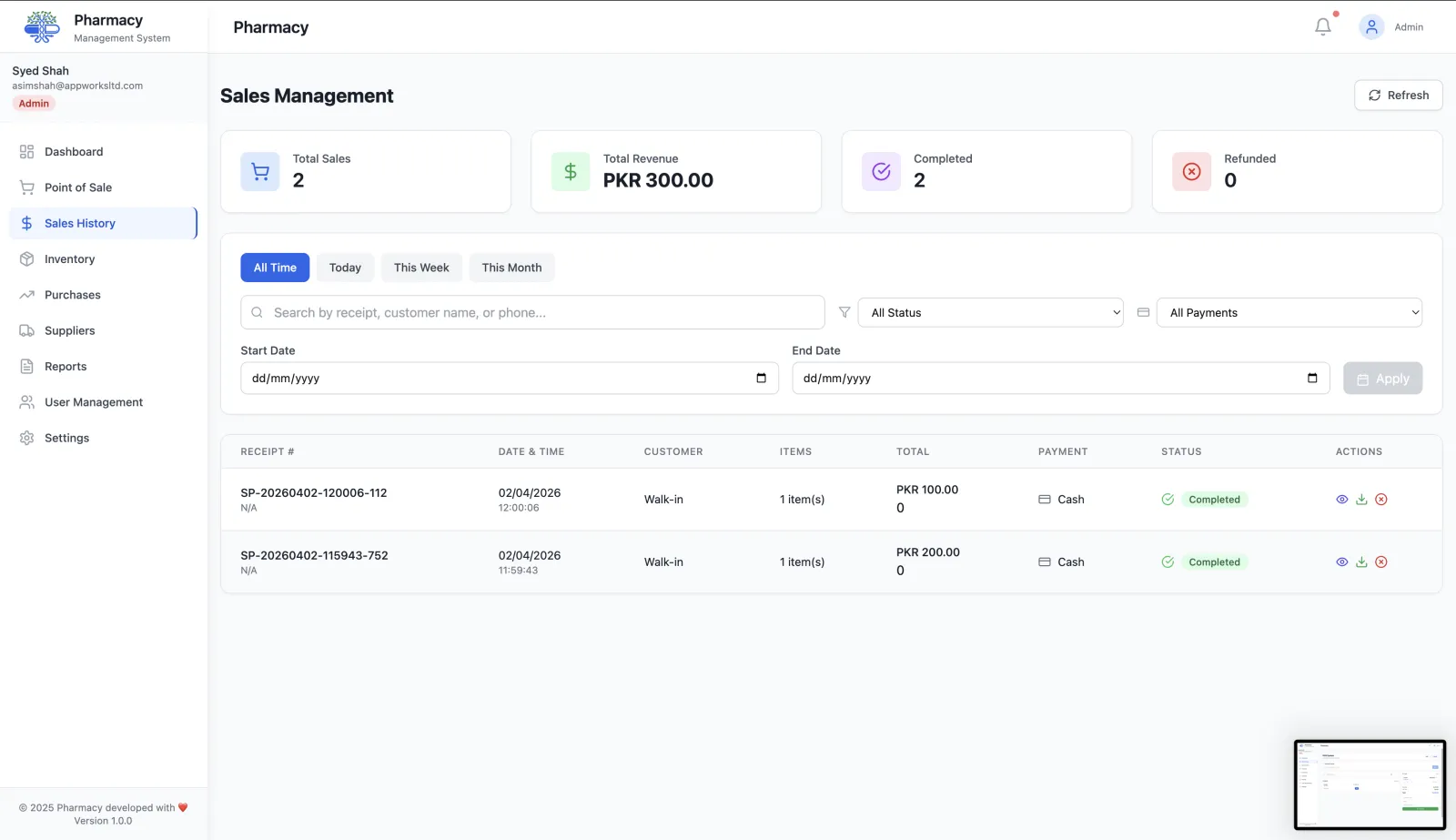
A complete sales history that's always accurate
Complete transaction ledger
Every sale is recorded with date, time, items, quantities, payment method, and cashier — searchable in seconds.
Filter by date range
Narrow down sales by today, this week, this month, or any custom date range to find exactly what you need.
Search by product or customer
Look up any past transaction by product name or customer details without scrolling through pages of records.
Receipt lookup and reprint
Pull up any past receipt and reprint it on demand — useful for returns, insurance claims, or customer requests.
Refund processing
Process returns against the original sale record. Stock is restored automatically when a refund is completed.
CSV export
Export your full sales ledger or a filtered subset to CSV for accounting, audits, or reporting to management.
Sales history powers your analytics
Sales records flow automatically into reports & analytics so revenue trends, payment breakdowns, and top products are always up to date. Every sale starts at the pharmacy POS and updates inventory in real time.
Finding and managing past sales
Every sale from the POS is stored with its receipt number, items, payment method and status, so any transaction can be found in seconds.
Search by receipt
Type a receipt number to jump straight to a sale.
Filter the ledger
Filter by today, this week or this month, by payment method, and by status: completed, refunded or partially refunded.
Open the details
See the items, quantities, discounts, charges and payment for any sale, and reprint the receipt.
Refund when needed
Process a full or partial refund with a required reason. The sale status updates so your records stay accurate.
Why a searchable sales history matters
Quicker returns
Find the original sale from the receipt number instead of searching paper rolls.
Accountable refunds
Each refund records its amount and reason.
Clean records for your accountant
Export a sales report for any date range to CSV from the reports page for bookkeeping and tax returns.
Spot problems early
Filtering by status and payment method makes unusual refund patterns easy to see.
Frequently asked questions
Can I process partial refunds?
Yes. Enter any amount up to the sale total and a reason. The sale is marked as partially refunded.
Can I export my sales?
Yes. The reports page exports a sales report for any date range to CSV.
Can cashiers see sales history?
Yes. Sales history is available to cashiers, pharmacists, managers and admins.
More questions? Read the full FAQ or contact our team.
Keep reading
Pharmacy POS
Pharmacy POS software for Pakistan: barcode billing, brand and salt search, box/strip sales and PKR payment records. Try RunMyPharmacy free during early access.
Reports & Analytics
Track pharmacy revenue, payment methods, top-selling drugs, expiry losses and sales trends. Export CSV reports for data-driven decisions.
User Access Control
Role-based access for pharmacies: Admin, Manager, Pharmacist, Cashier and Doctor roles with enforced permissions that protect sensitive data.
Barcode Scanning
Set up a keyboard-mode barcode scanner for your pharmacy POS. Learn product lookup, Enter suffix setup, stock checks and troubleshooting with RunMyPharmacy.
Try RunMyPharmacy free
Full access to every feature during early access. No credit card required.